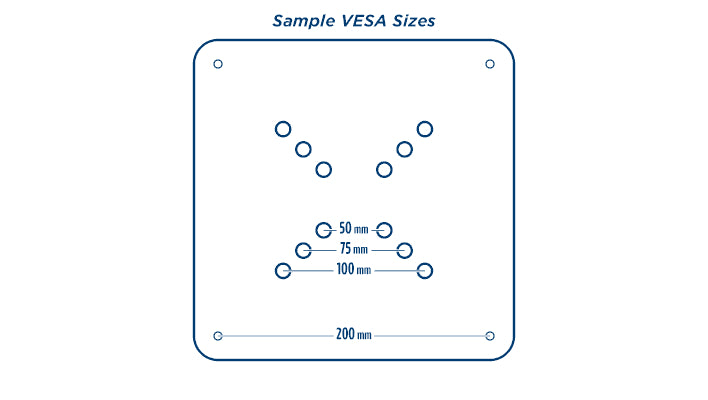


What is VESA and what does it have to do with my monitor?

Quick answer: VESA is the standard pattern of four screw holes on the back of a monitor or TV. The size is the distance between the holes in millimeters, written as width x height, such as 100 x 100. If your monitor's VESA size matches a mount's VESA size, the two will fit together, whatever the brand.

What does VESA stand for?
VESA stands for the Video Electronics Standards Association. This organization creates the technical standards for computer displays and monitors. VESA Mount standards ensure that monitors and mounts can be brand-interchangeable as long as the mount sizing is the same.
How do I find my monitor's VESA size?
If your monitor is VESA mount compatible it will have four screw holes on the back, arranged in a square or rectangle. To determine your mount size:
- Find the four threaded holes on the back of the monitor. On some monitors they are hidden under the stand or a plastic cover.
- Measure the distance between the holes from left to right, center to center, in millimeters.
- Measure the distance between the holes from top to bottom.
- Write it as width x height. Holes 200 mm apart across and 100 mm apart up and down are a 200 x 100 pattern.
Only have a tape measure in inches? One inch is 25.4 mm, so 100 mm is just under 4 inches and 200 mm is just under 8 inches.
The best way to be certain of your monitor's VESA size is to measure, or to check the specifications from the manufacturer.
What are the most common VESA sizes?
| VESA pattern | In inches (approx.) | Usually found on |
|---|---|---|
| 75 mm x 75 mm | 3 x 3 | Small to medium monitors, 12" to 32" diagonal |
| 100 mm x 100 mm | 4 x 4 | |
| 200 mm x 200 mm | 8 x 8 | Large monitors and TVs, larger than 32" |
| 400 mm x 400 mm | 16 x 16 |
Small to medium monitors (12"-32" diagonal) usually have a 75 x 75 or 100 x 100 hole pattern. Large monitors (larger than 32") usually have a 200 x 200 hole pattern, and their hole spacing usually goes up in 200 mm increments: 200 x 200, 400 x 400 and so on. Rectangular patterns such as 200 x 100 are also common.
What size screws does a VESA mount use?
The screw size goes with the hole pattern. Under the VESA mounting standard:
| VESA pattern | Screw size | Typical screw length |
|---|---|---|
| 75 x 75 and 100 x 100 | M4 | 10 mm |
| 200 x 100 | M4 | 10 mm |
| 200 x 200 and larger | M6 or M8 | 8 to 10 mm for M6, 15 mm for M8 |
Individual monitors can differ from the standard, so check your monitor's manual before buying screws. Most monitors and mounts come with the screws you need.
What does VESA have to do with a trade show kiosk?
A monitor kiosk holds your screen on a VESA mount, so the kiosk has to support your monitor's hole pattern and its weight. Check both before you buy a kiosk, or before you buy a monitor for a kiosk you already own. A screen that is the right diagonal size can still be the wrong pattern or too heavy. Adding a screen to a backwall or counter instead? See our monitor and tablet mounts.
Our best-selling monitor kiosk: the MultiMedia Twist Kiosk

The MultiMedia Twist Kiosk is a modern monitor stand that doubles as a standing workstation. We design and build it ourselves in Virginia from anodized aluminum extrusion and European Birch plywood.
- VESA patterns supported: 75 x 75, 100 x 100, 200 x 100 and 200 x 200 mm
- Monitor size: most monitors up to 43" or 30 lb
- Overall size: 32"w x 26"d x 78.5"h, with a 40" high counter
- Weight: 45 lb
- Setup: goes up and comes down in just a few minutes
- Options: locking door, casters, printed graphic panels, and Plexiglass or laminate shelves
- Built in Harrisonburg, VA from U.S. and imported materials, with a lifetime warranty against manufacturing defects
Which kiosk or monitor stand fits my monitor?
Our Twist kiosks and monitor stands use one of two mounts. Find your monitor's VESA pattern and weight, then pick from the matching row.
| Mount | Fits | VESA patterns | Kiosks and stands |
|---|---|---|---|
| Single pole | Most monitors up to 43" or 30 lb | 75 x 75, 100 x 100, 200 x 100, 200 x 200 | MultiMedia Twist Kiosk, MultiMedia Wing Kiosk, MultiMedia Bridge Kiosk, Ellipse Twist Kiosk, Ellipse Vertical Showcase Twist Kiosk, Twist Monitor Stand With Keyboard Shelf |
| Two pole | Most monitors up to 55" or 50 lb | 75 x 75 up to 400 x 400 | XL Monitor Stand, XL-23 Monitor Stand, Trapezoid Twist Kiosk |
| Your choice of either | Up to 43" or 30 lb with the single pole mount, or up to 55" or 50 lb with the two pole mount | 75 x 75 up to 400 x 400, depending on the mount | Rectangle MultiMedia Twist Kiosk, Rectangle MultiMedia Wing Kiosk, Rectangle MultiMedia Bridge Kiosk |
As a rule of thumb: if your monitor is 43" or smaller, weighs 30 lb or less and has a pattern of 200 x 200 or smaller, any of these will work. If it is larger, heavier or has a 400 mm pattern, choose a two pole model, which takes most monitors up to 55" or 50 lb.
Not sure which one you need? Call us at 540-438-9933 with your monitor's make and model and we will check it for you.
Common questions
Is every monitor VESA compatible?
No. Most are, but some thin or curved monitors and some all-in-one computers have no mounting holes. Check the back of the monitor or the manufacturer's specifications. Adapter kits are available for some models.
Does a bigger screen always mean a bigger VESA pattern?
Usually, but not always. Two monitors with the same diagonal size can use different patterns, which is why you should measure the holes or check the specifications.
Does weight matter as well as the pattern?
Yes. Every mount has a weight limit. A monitor has to match both the hole pattern and the weight rating of the mount.
Do VESA measurements have to be in millimeters?
VESA sizes are always stated in millimeters, as width x height. You can measure in inches and convert by multiplying by 25.4.
Now that you understand what VESA means, check out all of our trade show kiosks and monitor stands to see which one will work with your monitor size.