

Trade Show Kiosk and Monitor Stand Buyer's Guide

A trade show kiosk or monitor stand puts a screen at eye level in your booth, so you can run a video, a demo or a presentation without building it into your backwall. The two are different things: a kiosk adds a counter and storage around the screen, while a monitor stand simply holds the screen and takes up less room. This guide compares our three best sellers, all of which we design and build ourselves in Virginia, and explains how to make sure your monitor will fit.
 MultiMedia Twist Kiosk
 XL Monitor Stand
 Monitor Stand With Keyboard Shelf
 Ellipse Twist Kiosk
 Trapezoid Twist Kiosk
Kiosk or monitor stand?
| Kiosk | Monitor stand | |
|---|---|---|
| What it is | A counter with a monitor mounted above it | A slim stand that holds a monitor |
| Work surface | Full countertop | None, or a small shelf |
| Storage | Enclosed cabinet | None |
| Footprint and weight | Larger and heavier | Smaller and lighter |
| Best for | Interactive demos and a place to work | Showing video or slides |
Our three best sellers compared
| MultiMedia Twist Kiosk | XL Monitor Stand | Monitor Stand With Keyboard Shelf | |
|---|---|---|---|
| Type | Kiosk and workstation | Freestanding monitor stand | Monitor stand with a laptop shelf |
| Largest monitor | Most up to 43" or 30 lb | Most up to 55" or 50 lb | Most up to 43" or 30 lb |
| VESA patterns | 75 x 75 to 200 x 200 | 75 x 75 to 400 x 400 | 75 x 75 to 200 x 200 |
| Size | 32"w x 26"d x 78.5"h | 32"w x 20"d x 67"h | 23"w x 24"d x 73.375"h |
| Weight | 45 lb | 28 lb | 23 lb |
| Work surface | Counter at 40" | None | Laptop shelf at 37" |
| Storage | Hidden cabinet, optional locking door | None | None |
| Shipping weight | 55 lb boxed, 85 lb in optional case | 35 lb boxed, 72 lb in optional case | 30 lb boxed, 63 lb in optional case |
| Warranty | Lifetime against manufacturing defects | Lifetime | Lifetime |
| Turnaround | 6-7 business days after graphic proof approval, plus shipping time | ||

MultiMedia Twist Kiosk
Best for: an interactive station with a counter and secure storage.
Our best-selling kiosk is a modern monitor stand that works as a standing workstation, with room for a keyboard and mouse on the counter and hidden storage below for a computer. It is built from anodized aluminum extrusion and European Birch plywood, and sets up and comes down in just a few minutes.
- Monitor: most monitors up to 43" or 30 lb, VESA 75 x 75, 100 x 100, 200 x 100 and 200 x 200 mm
- Size: 32"w x 26"d x 78.5"h with the monitor pole, 40" high counter, 45 lb
- Graphics: front panel 23"w x 36"h, side panels 18"w x 36"h
- Options: locking door, casters, and Plexiglass or white or black laminate shelves
- Warranty: lifetime against manufacturing defects

XL Monitor Stand
Best for: the biggest screen, in landscape or portrait.
The XL Monitor Stand is a freestanding stand with a two pole mount that holds monitors all the way up to 55" or 50 lb, in either a horizontal or vertical orientation. Its minimal design puts the emphasis on the screen, with a graphic panel below that can be branded or left black or white. An optional Plexiglass light bar casts an accent light on that panel. It works pushed up against your backdrop or out on its own.
- Monitor: most monitors up to 55" or 50 lb, VESA patterns from 75 to 400 mm
- Size: 32"w x 20"d x 67"h, 28 lb
- Graphic panel: 16"w x 36"h with a vertical monitor, or 16"w x 44"h with a horizontal monitor
- Tip: place several stands side by side and run a single video across the screens
- Warranty: lifetime

Twist Monitor Stand With Keyboard Shelf
Best for: a compact screen with somewhere to rest a laptop.
This compact stand is an efficient way to display a monitor at your trade show. The keyboard shelf is the perfect place to rest a laptop if you plan on connecting one to the monitor. It is the narrowest and lightest of the three, and the entire stand packs compactly and ships efficiently.
- Monitor: most monitors up to 43" or 30 lb, VESA 75 x 75, 100 x 100, 200 x 100 and 200 x 200 mm
- Size: 23"w x 24"d x 73.375"h with the monitor pole, 23 lb
- Shelf: laptop shelf at 37" high, in white, black or European birch
- Graphics: two panels included, blank or printed: front 23"w x 36"h, back 15.75"w x 36"h
- Warranty: lifetime
What to check before you buy
Your monitor's size, weight and VESA pattern
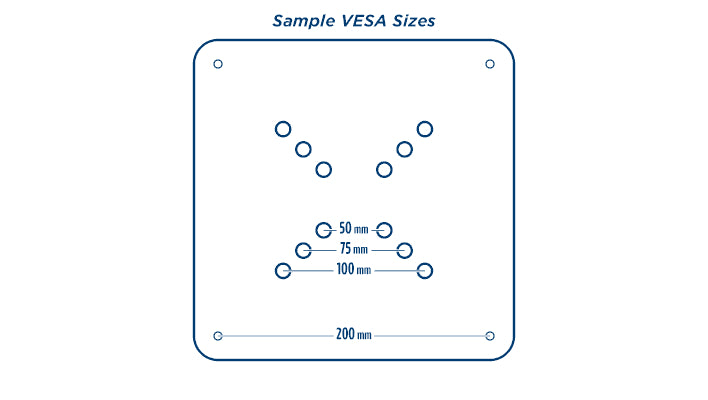
This is the one that catches people out. A stand has to match three things: the screen size, the weight, and the pattern of mounting holes on the back, called the VESA pattern. Single pole mounts take most monitors up to 43" or 30 lb with patterns up to 200 x 200. Two pole mounts take most monitors up to 55" or 50 lb with patterns up to 400 x 400. Our guide to what VESA is and how to measure it shows you how to check yours.
Landscape or portrait
If you want the screen turned upright for a digital poster look, choose the XL Monitor Stand, which is designed to hold a monitor in either orientation.
Do you need a work surface?
If visitors will type, sign up or try software, you need a counter: choose the kiosk. If a laptop will just feed the screen, the keyboard shelf is enough. If the screen only plays a video, you need neither.
Storage and security
Only the kiosk hides a computer, cables and personal items. Add its locking door if equipment will be left in the booth.
Floor space
The Monitor Stand With Keyboard Shelf is 23" wide. The XL Monitor Stand and the kiosk are both 32" wide, but the stand is only 20" deep and can sit flat against your backwall.
Shipping
All three break down to ship in a box, or in an optional hard case if you exhibit regularly. Weights run from 30 lb boxed for the keyboard shelf stand to 55 lb for the kiosk.
Which one should you choose?
- You want visitors to interact with the screen: the MultiMedia Twist Kiosk.
- You need to lock up a computer: the MultiMedia Twist Kiosk with a locking door.
- Your monitor is larger than 43", heavier than 30 lb or has a 400 mm VESA pattern: the XL Monitor Stand.
- You want a portrait screen or a multi-screen video wall: the XL Monitor Stand.
- You have a small booth or the smallest budget: the Monitor Stand With Keyboard Shelf.
- You want a kiosk and a monitor over 43" or 30 lb: the Rectangle MultiMedia Twist Kiosk with a two pole mount, which takes most monitors up to 55" or 50 lb.
Common questions
What size monitor fits a trade show kiosk?
It depends on the mount. Our single pole kiosks and stands take most monitors up to 43" or 30 lb. Our two pole models take most monitors up to 55" or 50 lb.
How do I know if my monitor will fit?
Check its weight and its VESA pattern, the spacing of the four screw holes on the back. Our VESA guide explains how to measure it, or call us with the make and model and we will check for you.
Are they hard to set up?
No. Each one assembles in a few minutes with the included Allen wrench.
Can I add my branding?
Yes. All three have graphic panels that can be printed with your artwork or left a solid color, and the panels can be replaced later.
Where are they made?
We design and build Twist kiosks and monitor stands ourselves in Virginia. Because they are built to order, we can accommodate custom requests.
Need help choosing? Call us at 540-438-9933, or see all of our kiosks and monitor stands.